Tuesday, February 26, 2013

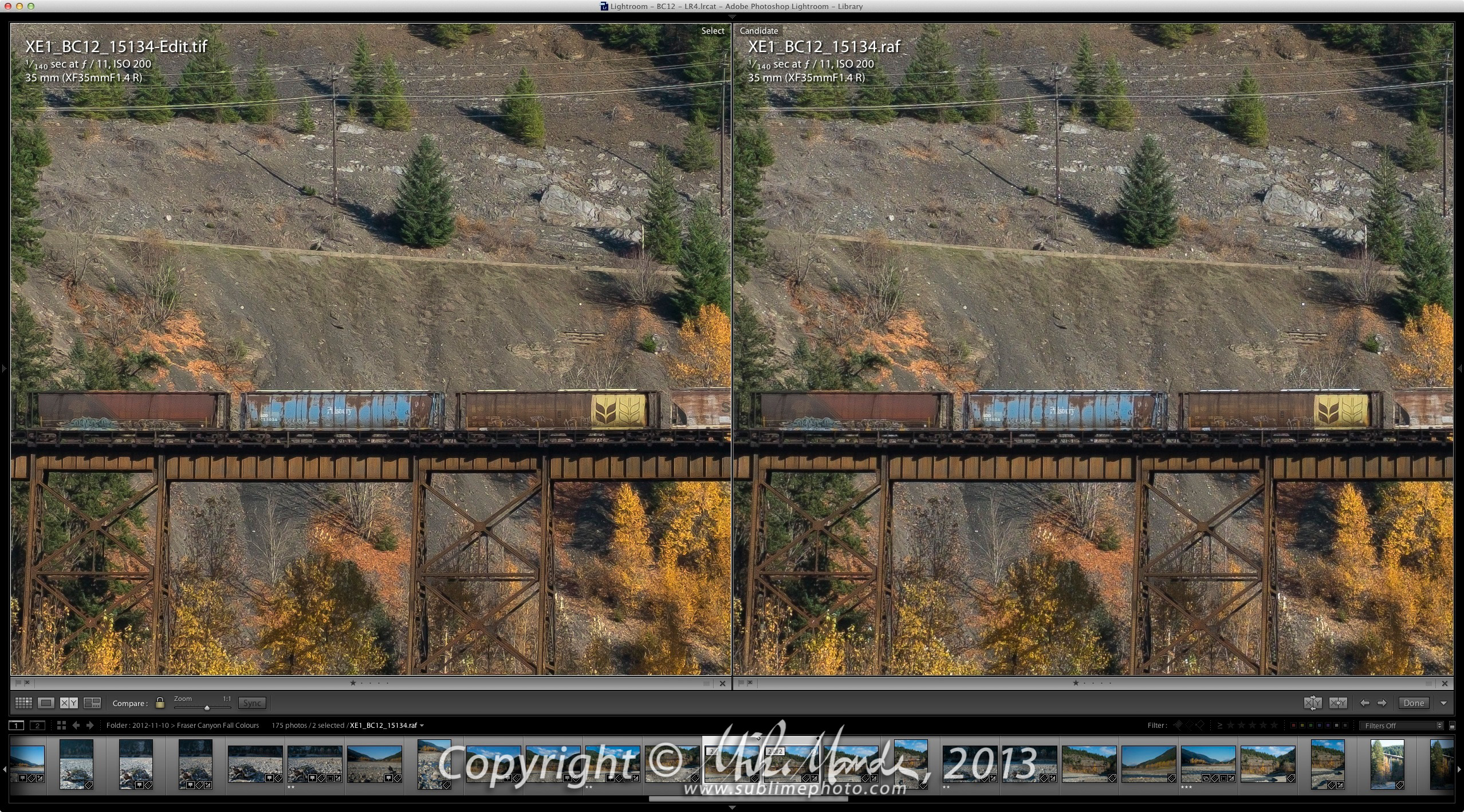
X-Trans Raw Files in Lightroom 4.4 RC

(Above, the left side shows the old conversion and the right side, the new)
Open full image: LR44_train_full.jpg

Yesterday, Adobe posted release candidate updates to Lightroom (4.4 RC) and Camera Raw (7.4 beta) on the Adobe Labs website. One of the key improvements, apart from some solid bug fixes and new camera support, is an update to their Fujifilm X-Trans raw conversion code. In their words: "...a correction to the demosaic algorithms for Fujifilm cameras with the X-Trans sensor." Well, the word "correction" doesn't do justice to all the improvements. Virtually all of the complaints I had about Adobe's X-Trans conversions have been addressed.

I have prepared some side-by-side comparisons of various images (Lightroom screenshots), converted with the previous Adobe X-Trans algorithm in Photoshop CS6 and ACR v7.3 (the left-side 100% crop), and Lightroom 4.4 RC (the right side 100% crop), which uses Adobe's new code. At 100% or 200% pixel-peeping zoom levels, the differences are clearly visible, if you know what to look for. Below each image is a link to open a 3000 pixel version of the full image in a new window, processed and output with the new Lightroom 4.4 release candidate. When you click on the side-by-side comparison screenshots, make sure you zoom to 100% on the window that opens to see the differences more clearly. Or save the shots to your computer and open them up in something other than your browser. The screenshots are from Lightroom sized to a 27" display, so they are 2556x1418 in size.

I have purposefully chosen images that look particularly bad, the worst ones I could find when viewed at 100% zoom, in order to illustrate the sometimes dramatic changes in this new update. In a few instances, the problems were serious enough that you could even see them in substantially downsized versions for the web, for example the "can" (compressed air can) image, the "railing" image and the "grass" image.

Monday, February 11, 2013

SFU with the Fujifilm XF 14mm f/2.8 R


On a beautiful Sunday yesterday (finally a nice day on a weekend!), I shot some images with the new XF 14mm f/2.8 R at Simon Fraser University. The gallery contains some more comments on this lens as well, but to summarize, I'd say that since it's such a stunningly good ultra-wide-angle lens, it would actually be worth buying an X-E1 body just to be able to use it, even if you don't have a Fuji X system yet! Well, in my humble opinion anyway. Can you tell I like this lens?

Sunday, February 3, 2013

Fog & Fourteen: Fujifilm XF 14mm f/2.8 R Review


I was at the Port Mann Bridge on a foggy night yesterday and captured some shots with my X-E1, including a bunch with the superb new XF 14mm f/2.8 R wide-angle lens, the latest addition to Fujifilm's excellent X-body lens lineup. This lens has a focal length equivalent to a 21mm on a full-frame camera. Many years ago now, back in 1984 in fact, I was shooting with my brand new Nikon FE2 and I remember being impressed after seeing the full arc of a rainbow in a Nikon brochure, and that was taken with a 20mm lens. If I had to choose any one ultra-wide-angle focal length, it would indeed be right around 20mm mark, so this new lens is exactly what I had been waiting for. Quite simply, the optical quality of this lens is stunning, one of the very best ultra-wide primes I have ever shot with. For a variety of initial images shot with the 14mm, see the following gallery...

Gallery: Fujifilm XF 14mm f/2.8 R - First Tests

The above gallery also has a condensed review of the 14mm lens, but see the rest of this blog entry for further details, clarifications and sample images.

Tuesday, December 25, 2012

Season's Greetings!


Sunday, December 16, 2012

2013 Rocks of the Southwest calendar...


Well, it's that time of year again... time for a new calendar for friends and family. This year I was drawing a blank for quite some time, trying to get inspired to do another calendar. I didn't really want to do "normal" southwest landscapes calendar again, mainly because my trip in the spring of 2012 had very little in the way of interesting weather or light, the above shot being one of the few exceptions. I didn't find my shots compelling enough to enthusiastically put them into a calendar, although I suppose it should have been easy to do one. I had mulled over the idea of making a "Vancouver at Night" calendar, but while I have taken tons of night shots in the last few months, inevitably, they were from the same three areas around Vancouver and I couldn't see myself making a calendar from those either.

Just the other day, I decided to take advantage of a sale from Topaz Labs and bought a couple of their plugins that I did not yet own. I rarely use plugins, but I find Topaz makes some of the best around. I bought their convolution sharpening plugin "InFocus", which I haven't really used yet, and also their B&W conversion plugin, simply called "B&W Effects". I was fiddling around with it on some images and suddenly came across an interesting toned look. After more fiddling with an opacity slider, allowing some of the underlying original colour to show through, I actually rather liked what I was seeing as far as muted colours, boosted micro contrast and overall austere tonality. The plugin's own grain effects were pretty dismal I thought, so I decided to modify the grain action I had created myself for my digital B&W infrared shots. Bingo... suddenly an interesting look that I started to like and the more I played around with it, the more it grew on me.

I'm not sure if I'll be so fond of this look after a few months of having a calendar on the wall myself, but since I was in an artistic funk and couldn't decide on what to do, well, this was a quick way out, almost an act of desperation! Now I only hope the people I'll be giving the calendar to don't look at it and think to themselves "...WTF is that? Did he scan some old, faded, grainy colour film or something...?!" Actually, all these shots were originally taken with my Panasonic GH2. Anyway, the twelve months of images appear after the break...

Sunday, December 9, 2012

X-E1: High ISO and XF 18-55mm Review


I recently picked up Fujifilm's excellent "kit" zoom for the X-E1, the XF 18-55mm f/2.8-4.0 R LM OIS. It uses a new linear-motor for AF (the LM in its name) which is fast and silent when focusing, and it also has an effective optical image stabilization system (OIS). For a reasonably compact kit lens, the f/2.8-4.0 range is quite bright and with the fairly large APS-C sensors on the X-Pro1 and X-E1, you can get decent subject isolation, especially at the long end, when shooting wide open. From an overall image quality standpoint, the lens is impressive with surprisingly sharp results corner to corner, even at wider apertures. For an extra $400 when bundled with the X-E1 body, this lens is a bargain as far as I'm concerned! The gallery linked above was all shot with the X-E1 and this new 18-55 zoom. In addition, there are many high ISO samples too...

Sunday, December 2, 2012

X-E1: A Beautiful Sunday in November


A gallery, shot a week ago with the Fujifilm X-E1: A Beautiful Sunday in November

Saturday, November 24, 2012

Fujifilm X-E1: Dynamic Range and More Comments


The above animated GIF I made, shows an example of what sort of range one can get from a single raw file. It is an image that was included in the night shot gallery linked to in my previous X-E1 post. The dark version is how the default conversion settings look (my defaults, that is, ones that already give slightly more shadow detail than normal), when processing through Adobe Lightroom v4.3RC. The bright version is the final result. Most of the adjustments were just done with the highlight and shadow sliders, but in this case, I wanted to darken the bright interior down more without darkening the outside lit walls too much, so I did some selective adjustments for the windows. I was a bit sloppy and didn't isolate the main yellow door frame enough in the "after" version, so it has darkened down a bit too much for my liking. In any case, it serves to illustrate that one can get a remarkably good dynamic range from a single raw X-E1 file. Hopefully people don't find the continuously running animation above too annoying!

If you click the image (or the link below it), you'll be taken to a gallery with 24 image pairs, all taken from my previous X-E1 galleries, each pair starting with the "after" version and the image to the right is the "before", the original unadjusted version. It is effective to use the right and left keyboard arrow keys to switch between image pairs, so you can see a smooth fade from before to after and back, similar to the above animation but in higher resolution. Some images have fairly minimal adjustments but I thought it would be helpful for people to see how much manipulation has gone into the final versions, especially the night shots. On a few you'll see some slight tilting caused by perspective corrections where I either didn't quite get the shot perfectly lined-up, or where I intentionally tilted up or down for compositional reasons.

Sunday, November 18, 2012

Distraction: The new Fujifilm X-E1

[ Update: Added a link to a gallery of samples from the XF 60mm f/2.4 Macro ]

I've been meaning to post a mini review on the Nikon D800 body, but along comes Fujifilm to entice and distract me with yet another new camera! For those following this blog, you'll remember how taken I was with the Fujifilm X100, the fixed-lens 'retro' body that I got in March of 2011. In fact the X100, with its beautiful 23mm f/2 lens (35mm in full-frame equivalency), along with my Panasonic Micro-4/3 gear, is what accompanied me on my trip to Germany in 2011, where I left my heavy Canon DSLR kit behind. Funny enough, it happened numerous times during my travels in Germany that people walked up and asked if my X100 was an old film Leica! So the retro design is certainly aesthetically effective, but beyond that, I find it a joy to use a camera with mechanical f-stop, shutter speed and exposure compensation dials. You can glance down, even with the camera switched off, to confirm your settings and the tactile feel of the controls just adds to the pleasure of shooting with it somehow. In addition, being right-eyed, the position of the viewfinder means I can keep the camera snug to my face without having my nose press up against the LCD display. Despite its initial quirks, annoyances and performance issues, virtually all of which Fujifilm addressed in subsequent firmware updates, I loved using that camera.

However, from the moment the X100 was announced, I so wished that it had the ability to change lenses! Yes, as a fixed lens, the 35mm f/2 was pretty much the perfect choice in my opinion, but I like w---i---de angle lenses and for me, the 35mm is kind of boring. What I was almost hoping for, more than interchangeable lenses, was a slew of different X100 bodies, for example an "X100w" that had a 24mm equivalent lens, an "X100n" with a normal 50mm and an "X100t" with a short 85 or 90mm tele. That would have been very sweet indeed! However for most people, just being able to change the lens is enough, and it would keep costs down compared to having multiple fixed lens bodies, so when the X-Pro1 was announced I was pretty keen...