
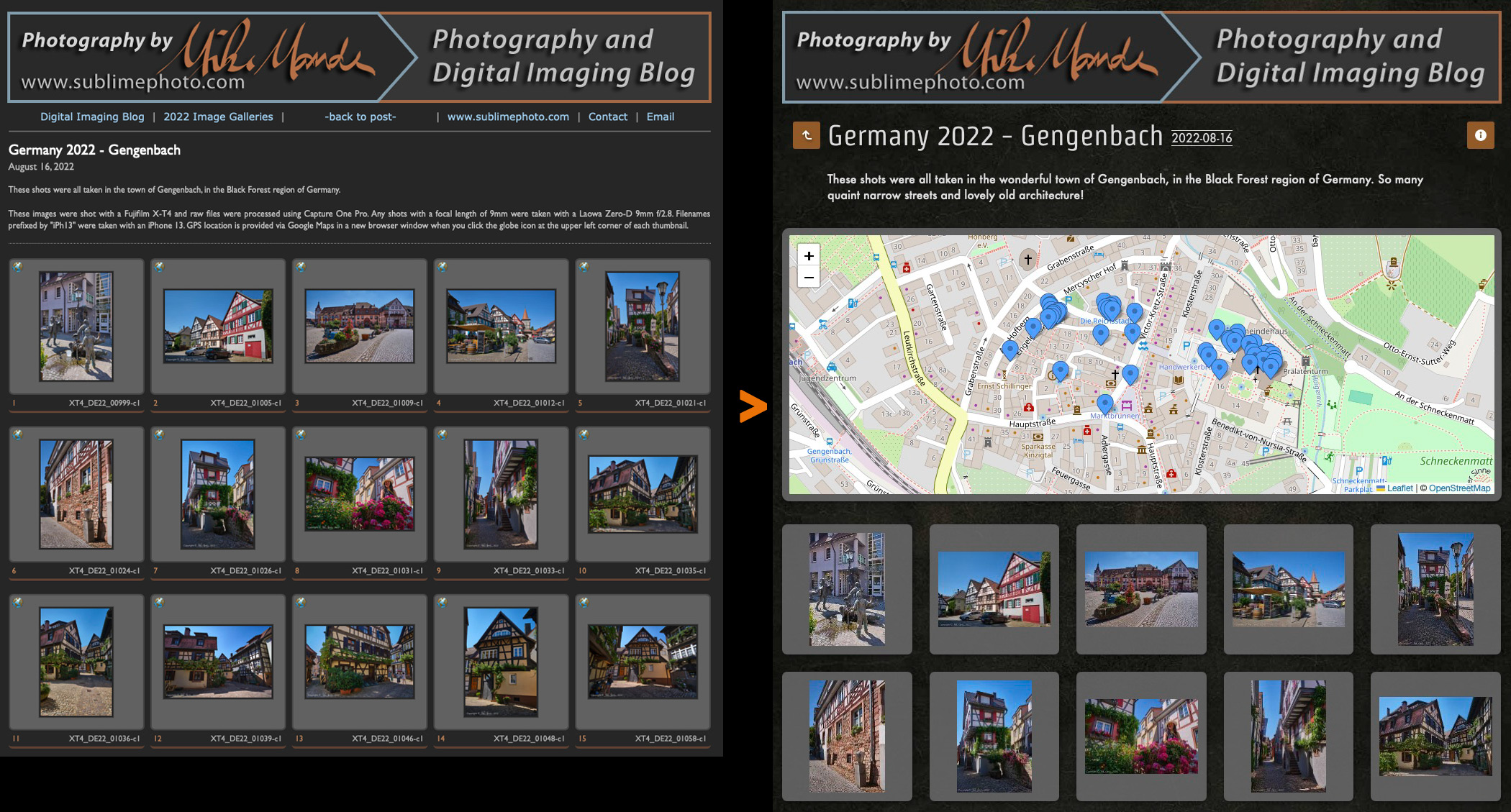
An example of my previous web gallery look (left) vs. the new look with jAlbum (right)
Finally, just about a week ago with the latest update to Adobe Lightroom (v.15.5.1), the TTG Highslide export module that I had bought, extensively customized and had been using for the last 16 years, has stopped working properly. Exporting a gallery gave messed up formatting and visible XML code scattered all over every page, so finally it became totally unusable. I can’t really complain too much, since I did manage to eke out 16 years of use from that plugin!
Interestingly enough, a few weeks prior to the Lightroom update, I had already started hunting for alternative web gallery software since I had a feeling I might need something in the near future. Since I no longer wanted to be at the mercy of Lightroom updates, I tried a number of different stand-alone web gallery export programs and emailed a few companies for details when they didn’t have free demo versions. Unfortunately none gave me the flexibility and features I was looking for either, and no company I contacted even bothered to reply back to my questions. With some more research and more specific Googling, I finally came across jAlbum (https://jalbum.net) the other day. After some promising tests with the free, feature limited version and seeing some sample galleries online that seemed to do most of what I wanted, I decided to give it a go.
It turns out that jAlbum is insanely flexible software and what few settings I couldn’t tweak in the software, I was able to add my own custom CSS code to override defaults. I am using their “Tiger/Exhibition” theme with various CSS tweaks that only took me a few hours to mess around with and fine tune… and while I might continue tweaking things like fonts and such, I do think I’ve found my new web gallery software!
What is super cool is that I can have a map view at the top of the gallery showing pins where all the photos were taken, as you can see in the above screenshot, and you can zoom in and pan around this map view. Clicking on a pin will actually take you right to the corresponding photo in the lightbox view. Nice! When you are in the lightbox, you can double click on an image to zoom in to the full resolution I’ve uploaded, and you can then drag around the image to see all parts of it. A second double click zooms back out to fit. This is far more convenient than with my old web galleries, where you had to click on a button to open a larger image in a new window. Under the image is a button to show “Photo data” where a pop-up window opens with detailed and customizable EXIF data, and a "Map" button where a pop-up windows shows exactly where the photo was taken.
You can use the keyboard arrow keys to go to the next and previous images, escape exits and there is a strip of buttons at the top, where you show a thumbnail strip, go full-screen and more. In addition, on phones and tablets, this new web gallery functions much better than my previous one, since you can swipe back and forth to move between images, single or double-tap to zoom in etc. It is far more responsive and consistent.
Then, back on the main gallery page, there is also an orange "up-arrow" button to the left of the gallery title, which takes you back to the original blog posting, and an orange "Info" button which pops up a window with a link to email me, copyright info, a link to jAlbum and the Tiger theme, as well as some photo geotagging info.
Since I actually do like this new web gallery software a fair bit better than my previous, my plan is to transition the last few years of web galleries to the new style. It is actually amazingly quick and easy to do! I have already switched over all the linked galleries from my 2022 Germany trip, and I plan on eventually updating all my galleries from 2020 onward with this new style. I have already updated all the galleries I've so far posted from my 2024 Southwest trip and obviously, anything new going forward will also use this new style of gallery.
For a more detailed look at my journey through various web gallery styles, you can see my recent blog posting on the Beau Photo website here: A Web Gallery Journey Over the Years


0 comments:
Post a Comment